Two weeks ago, I received an invite to the beta of Lift, a new iPhone app for goal tracking and changing habits. There’s no shortage of apps that promise that, with their use, you can achieve any goal. I’ve tried Streaks, Ritual for the iPhone, as well as Joe’s Goals on the web, and a few others with various levels of permeability, and intrusiveness. Lift is among the least intrusive of the various apps I’ve tried, and yet in the last two weeks—though mostly in the last week—it’s been working well. The final release hit the App Store a few days ago, so let’s take a look.
First Impressions
Lift is a pretty app. The main screen is rendered in lovely soft shades of white and gray with a little bit of soft blue on the buttons at the bottom. On the main screen, checked in habits are a shade of green. Elsewhere in the app, a shade of orange is used to draw attention to your streaks and other good things. Pretty as it is, I can’t help but think the developers all had white iPhones to test it on. The Lift website shows the app running on white iPhones where it looks a lot nicer than it does on my black iPhone—not that it doesn’t look good on black. The app icon is also attractive, and sits well on my home screen. There aren’t a lot of nice, white icons on my phone, though I’ve ended up with three white icons of varying attractiveness on my home screen. Lift’s is the prettiest. (Sorry, Instapaper.)
Using Lift
With any application of this sort, there is an easy temptation to load it up all at once with all the little things you want to change about yourself. Having made that mistake before, I settled on starting with only three habits: floss, write in my journal, and work on my secret project. (I will not tell you what my secret project is. It’s secret!) When I tried Lift in beta, the habit list was already populated with a number of habits to try. It’s not clear how to add new habits that aren’t in the list. Typing your new habit in the search field allows you to create it, and new habits are added to the global list for others to start tracking. You may find you’re not the only person out there trying to do an three hours of underwater basket weaving per day. There is no way to re-order the habits in this list, which is both a good and bad thing. It reduces the time you can spend fiddling, but if one habit is less of a concern than the others, you can’t shove it down the list.
All your habits appear in a list on the application’s main screen. Tap one, and you see a big button with a checkmark, and a little chart of the frequency of your checks per week for the last five weeks. Below that, there’s a list of the checkins of other people working on the same habit. If you so choose, you can scroll through and tap a little “thumbs up†icon and give “props†to your fellow self-improvers. Checking in adds you to the list, and the “thumbs up†icon is replaced by a pencil icon, to let you write a quick note on your check in. The “props†feature is nice, though I don’t use it much. As for writing notes on your checkins, it took me a few pokes in the app to discover the feature. I don’t think the global list is the best place for that icon, but that’s a minor issue.
On the main screen, at the bottom-left is a button that allows you to see your stats for your various habits over the last seven weeks. Tapping any habit gives you a more detailed view, with options for a calendar and reviewing your notes. It’s not a feature I use very much, but then again, I’ve only been actively using Lift for about a week, which doesn’t give me much data to display. Everything is represented in a very attractive way, however, and I look forward to the day when I will have a lot of stuff in there to look over. Lift also lets you look at your habit statistics through a beautiful web interface, but actual checkins have to be done with the app.
Notifications and Alerts
What notifications? What alerts?
This is not a shortcoming. I mentioned before about “alert fatigueâ€, and so Lift’s lack of alerts comes as a refreshing relief. Lift makes you come to it, and that forces the user to have a certain degree of mindfulness that more aggressive applications don’t cultivate. I’m more inclined to blithely ignore a notification to review my day and check in if it pops up in the middle of my winding down period at night. Lift’s attractiveness and user-friendly interface compels me to use it in a way that a number of previous applications have decidedly not.
Social Networking
It’s been said that the more people you have supporting you in a life change, the better your chances of succeeding. Lift allows you to tie it in with Twitter through the built in iOS 5 Twitter integration, and with Facebook. However, the social features are limited to just pulling in your profile pictures. Lift does not tweet or update Facebook statuses. You can invite friends to use the app, but it doesn’t pull contact information in from any of your social networks, or even the iOS Address Book. I approve entirely of this. Personally, I do not like application posting to my Twitter or Facebook accounts, unless I explicitly tell it to. Props to Lift for keeping things private. Hopefully it’ll stay this way in later updates. Thankfully, you do get the support of all the people using the app, stranger and friend alike.
Is It Worth It?
Lift suffers from the same potential pitfall that all of the other applications in this genre suffer from: the human factor. While it’s the prettiest, and most frictionless of these applications I’ve tried, it does me no good if I neglect it. It has made its way from my second home screen to my primary one, and I’ve been launching it daily before I wrap up for the evening. What worries me is that, one day, the novelty of the application will wear off and I’ll be back where I was before. This is a problem with me, not with Lift, and hopefully I can overcome it. I do feel really good about Lift helping to keep me mindful, however, in a way that none of the other applications I’ve tried have.
Another point of concern is that Lift is a free app, and I wonder how they plan to keep it going and make money if it succeeds. For something this attractive, I would have happily spent anywhere from $.99 to $2.99, and given serious consideration to spending up to $4.99. If Lift went the ad-supported route, I’d probably keep using it, but I can’t imagine ads being integrated well into the gorgeous interface. If the people behind Lift can keep things going, long-term, I can see myself using it for a long, long time. You can get lift in the App Store for free here. Pick it up, and support them.
When this goes out, I’ll likely be on the road to my new life in New York City. These last few weeks have been absolute chaos, particularly the last couple days. In the last 72 hours, I cut my wardrobe by half, cleaned an apartment, packed up my life, shoved all but the barest essentials into a storage shed, and the rest into suitcases, backpacks, and bags. I’m writing this now, in the spare bedroom of my parents’s condo in Northeast Philadelphia with my sinuses clogged from my cat dander allergy.
I do not know how I will sleep tonight.
This is finally happening. Years of delay, some externally caused, mostly my own fear and laziness, are finally over and I’m making the move. It’s a risk. I don’t have a lot of money. I don’t have a job. I have bills to pay. I have a place to live that I don’t have to pay rent for—a rare luxury for someone like me. I have to hit the ground running. Then, I have to keep running.
If I stop, I will die.
For me, death is being shoved back into a shared fabric covered box, moving papers from Point A to Point B. Death is strapping a headset on and calling people who don’t want to be called to push products they don’t want. Death is when I give up, take the “easy” route and give up my dreams, my desire to live by my own means and make stuff. Death is when my brain eats itself trying to survive eight hours a day of labor that can be replaced by a clever script programmer, or an auto-dialer and an answering machine.
I am running now. I’m picking up speed. The road stretches on ahead, where it goes I don’t know, but it’s there and I’m following it. There will be forks along the way. When the come along, I will have to make a decision, but I will keep running. It’s an open road, and I should be able to see any forks before they arrive, as well as any other obstacles to overcome. After all, I’ve overcome the first one. I’ve started. It’s physics.
An object in motion will remain in motion unless acted upon by another force.
In this corner, costing $39.99 and wearing purple trunks, please welcome the 800-pound gorilla of task management, the titan of to-do lists, the giant of GTD, OmniFocus!
And in this corner, costing $49.95 and wearing blue trunks, please welcome the little app that could, the tortoise to the hare, fresh from a four-year nap and ready to sync, Things 2.0!
Alright. I want a good, clean fight. No hitting below the belt, and no violating Apple’s sandboxing rules.
*ding, ding*
Quite literally a couple of months ago, I switched from Things to OmniFocus. This was not done lightly, as I’ve tried OmniFocus in the past, and couldn’t make heads or tails of it. With this latest attempt to make OmniFocus work for me, I at least managed to keep my head above water for a time. This was probably by virtue of using the iPhone app first rather than diving into the deep end of the Mac app’s absolutely confounding and endlessly fiddly interface. Instead of staring down a blank, intimidating void, I was able to acclimate to OmniFocus though the gentler, more obvious iPhone interface. I even managed to recover from a database sync disaster early on with no outside help. Once I started using the Mac app heavily, however, I began to feel overwhelmed.
One thing I’ve learned about myself in my brief time on this planet: if you give me something to fiddle with, fiddle I will, often to the detriment of getting anything else done. OmniFocus has endless ways to fiddle. I can add start and due dates set down to the minute, tweak contexts to be super-granular and location-aware, hook it up with Siri, set up perspectives to get a different view of things that need to be done, script it and use templates, customize the theme… There’s so much that can be done to get stuff into OmniFocus and have OmniFocus nudge you to do stuff. It’s the Swiss Army Knife of task management applications. Sure, you can use it to whittle, but even as you whittle, the corkscrew, fish-scaler, tweezers, magnifying glass, bottle opener and other geegaws are there to tempt you.
Things is much, much simpler. It’s not as simple as some apps, but compared to OmniFocus, it’s a breath of fresh air. It may be that I lived in Things for so long, but opening it up again and seeing the soft, slightly textured blue-gray window felt like coming home after a long journey. Well, coming home to a house where I had forgotten have the mail and newspaper delivery held, as a bunch of my repeating tasks—bills and errands, mostly—had piled up. First thing I did was clean up. I’ve opted to start over from scratch this time, and hopefully get my system right and avoid the pitfalls that made me want to switch away in the first place.
One of the problems I’ve had with Things and OmniFocus is figuring out what goes in there. Is my list of artists and albums to check out for future Crush On Radio picks a project? Books to read? Post ideas for Sanspoint? Does any of these belong in my task manager? If so, how do I organize it? These are fundamental problems of any GTD system, and I’m going to be wracking my brain to figure out a solution for a while. For the time being, endless lists like this will end up going into my system in some form, once I can establish a method for doing so. In fact, this is one of the areas where OmniFocus does beat out Things—there’s the option to set a project as merely a list of unconnected Single Actions [1] with no “completion” state, which served as good buckets for lists like that. Things is a bit less structured, but the “Areas of Responsibility” feature might make for a good substitute.
Things is also a little more nebulous with regards to GTD’s Contexts. [2] OmniFocus is built around a canonical GTD view of Projects and Contexts. Actions are part of a Project, and assigned to a Context. All actions can be viewed in relation to either Contexts for the actual implementation phase, or Projects for review. Things doesn’t have any specific implementation of Contexts. Instead, there’s the “Areas of Responsibility” which can house projects and actions, though an action housed in an “Area of Responsibility” cannot also exist as part of a project. This is mildly infuriating. I’ve taken, this go around, to using the application’s tagging feature to add contexts to actions, which feels like a serious kludge.
What I have to figure out, when it comes to these potential trusted systems, is which allows me the least friction not only in getting my stuff in there, but processing it and doing the work. It’s easy to get stuff into OmniFocus, but it’s hard to process and organize that stuff due to both the friction inherent in the interface and my own endless desire to fiddle and futz to get my tasks organized just right. Things is slightly less flexible in terms of getting stuff in, but so much easier to take what’s already in the app and process it. The final part, the actually getting things done part of GTD, is something that can’t be fixed by software. My hope is that if I can reduce the friction of getting stuff where it needs to be, I can reduce the friction of actually doing what needs to be done.
GTD Parlance for tasks that are self-contained and not part of a larger project. ↩
The general GTD definition of a Context is a location, tool, or person necessary to perform a task, e.g., the office, the phone, your boss, etc. The original canonical GTD definition was more tied to physical location, but technology has ruined that. ↩
My primary machine is, to borrow the parlance of Andy Ihnatko, a 2008 White MacBook Nothing. It was my college graduation gift, outfitted with the fastest processor and biggest hard drive available on the model, but the base 2GB of RAM, which I upgraded to the max of 4GB on my own. It’s gone from Leopard to Snow Leopard to Lion without a hitch. I’ve had no show-stopper issues, just a swollen battery that the Apple Store swapped for me without a question. Four years later, however, and it’s finally showing its age a bit. It has three problems that have me moaning a bit with the unfulfillable desire to finally upgrade.
The backlight inverter needs to be replaced. As this is my only machine, I’m unwilling to part with it for however long it would take for a Genius to replace it, and it’s an arduous enough repair that I’m unwilling to do it myself. Fortunately, keeping the brightness at about 50% keeps things going.
Since starting Crush On Radio, I’ve been doing some heavy-duty audio editing every week, and it’s been a bit of a chore to do. Performing tasks like Normalization, Compression, and MP3 conversion on a sixty to ninety minute podcast can easily take up about half the actual time spent editing. A faster machine would easily cut down on the time needed.
It can’t run Mountain Lion. At least, it can’t run Mountain Lion easily, or in a supported configuration that’ll make updates and things sane.
I’ve been lusting after the new, 15-inch Retina MacBook Pro, but even if I could afford an upgrade right now, I couldn’t swing that. [1] I’ve also lusted after the 13-inch MacBook Air, but I’m not sure that its svelteness is suitable for how I work, which is with the laptop latched to a 22-inch external display. Of course, I’ll be putting the giant display in storage in a couple weeks and living back in the space of a 13″ display again, soon, so we’ll see how that works out. Either way, some of the same problems that have me disregarding the Retina, even if I could afford it, have me disregarding the Air. If I had to upgrade, I’d have to go for a 13″ Pro, and even then… I just can’t swing it with the move coming.
So, I’ll make do.
The last major hardware upgrade I made was to the iPhone 4S from the iPhone 3GS. I made it because I could easily afford it, my contract was up, and my 3GS had taken some battle damage to the headphone jack in a failed mugging attempt. [2] I had considered just replacing it with an iPhone 4, because I knew I really didn’t need Siri or the fancy camera, but I did need at least 32GB of storage. With the 32GB iPhone 4 unavailable, I went for the 4S. In about a month, if the rumors hold true, the iPhone 5 will be released. It’ll have a bigger screen, LTE, a new dock connector and probably a surprise “One More Thing” feature that’ll set me to drooling. I will not upgrade.
For what it’s worth, I don’t have an iPad either—even an original model iPad. When the new iPad came out, and the iPad 2 went down to $399, I considered getting one for about five minutes, then disregarded it because I have no place for it in my life and workflow. That’s not to say I wouldn’t find a place if I had one. I’ve been told that the iPad version of OmniFocus is probably the most user-friendly of the bunch, and I’d love to give it a try. It would be nice to have a big, backlit screen to read Instapaper articles and Kindle books on. I could sit on the couch and write. I’d find a reason to use the damn thing, but as it stands, between my MacBook and my iPhone, I don’t have a compelling usage case for an iPad so that’s $600 I don’t have to spend.
The point is, the tools I am using are enough. They work fine, display issues with my MacBook aside. Even though I can’t upgrade to the latest, greatest version of OS X, it doesn’t look like there’s any compelling reason to do so on the application side. Without that compelling reason, why bother? The latest episode of the Enough podcast drives that point home. For myself, it’s a cost/benefit analysis question, where the cost is something I can’t afford, and the benefit is something that would be tangible in a certain aspect of what I do, but not tangible enough to make me make the jump.
If I had to finally put Madame Psychosis [3] out to pasture, what I would find myself looking at for an upgrade are the refurbished MacBook Pros. No, they won’t be top of the line out of the box, but they’ll serve my purposes well. My first Apple laptop was a refurbished iBook G4, and it was so reliable that when the internal fan failed, I didn’t notice for months. Thing was a tank. If the Intel transition hadn’t happened almost immediately after buying my original Mac, I would probably have kept my first mac, the old G4 mini, and my iBook as my primary machines for longer than I did. They were enough to keep me going through three years of college, which is saying something.
Good as new for less, is better than new for more. The tools I need are tools that are good enough to last and powerful enough to do what I need to get done. I’m willing to pay what it requires to get something that can and will last. Sometimes you should spend a little more, and sometimes it’s worth saving up. I’m going to move, find a job, get an apartment, start my life up in a new place, and when all that is done, start putting the money aside to buy a new MacBook. Maybe by then, they’ll have Retina displays in the MacBook Air. Wouldn’t that be sweet?
This past Thursday, I interviewed for a job that I was barely qualified for. This wasn’t apparent when I started the whole process, but as the interview progressed, it dawned on me that if I did get the job, I would be in over my head and have to tread water, fast. Despite that, I felt the interview went well enough that the job was in my grasp. Friday, I obsessively checked my e-mail, hoping for a response. Same thing on Saturday, Sunday, and Monday. At last, a little after five o’clock on Monday evening, I got the news.
They told me no.
And I’m fine with that. “No” is not the answer I wanted, true, but it was the answer I was prepared for. As They Might Be Giants said, “If it wasn’t for disappointment / I wouldn’t have any appointments”. But, disappointment is not the same thing as failure. I don’t feel like a failure because I was told “no.” That I even got a chance to interview, to show off my skills on the command line to an audience and have the opportunity to prove myself based on a polite e-mail message and a couple of portfolio pieces is enough to make me feel like I won something.
I tried. They said no. Time to dust myself off and try again.
The fear of rejection, the fear of being told “no” stands in the way of so many of us. Nobody likes to be denied something. When the opportunity to go for something that’s so far out of our reach comes to us, we freeze. “What if I don’t succeed?” we tell ourselves. “What if they say no?” Truth is, as my father says, the worst thing that could happen is that they tell you “no.” They can tell you “no” in many ways. They can be polite about it, or they can punch you in the gut. They can say it quietly, or they can scream it until your ears bleed. They can use flowery, verbose language that makes it sound like they’re not saying much of anything at all, or they can be blunt. It’s all still “no.”
I suspect part of it comes from expectations, and the way people define themselves on their successes and failures. Nobody wants to be branded a failure, but we all have far more failures than we have successes. Allow me to quote myself:
Failure is seen by many to be a permanent state. I blame report cards. That F you got in first quarter English goes on your Permanent Record, or so they say. You failed, and therefore you shall be forever branded as “The Failure,†right? Guaranteed, inside of a decade, or less, nobody will remember your failure except you, much as nobody will remember you getting a boner when standing in front of Ms. Grundy’s classroom in 5th Grade.
I don’t have the psychology and sociology background to explain Western society’s distinct love of shortcuts to success, to the point where books like The Secret sells over twenty-one million copies. Despite it, there’s a wonderful dichotomy between the fetishization of success, and the lengths people are willing are to go to skip the work. Even I would occasionally chip in two bucks to the office Powerball fund, despite knowing the insane odds against winning. What’s the worst that can happen? I’m out two bucks that would have gone into the snack machine, anyway.
There is a scarier prospect than being told “no.” and that’s this: What if they said “yes?”
Then, in this case, it would have been brown-trousers time. Because it’s something I wanted, I would have dived in with gusto. However, for just as many people afraid of failure, there are as many or more afraid of success. For most things we try, failure just means we’re back where we were before. Success means that everything changes, and nobody likes change. The best part of being in a stuck in a rut is that it’s your rut. It’s made for you, or you for it, like Douglas Adams’s puddle. Some force has to shake us out of our rut, and that force can be either internal or external. Sometimes it’s both. We also don’t like stagnation.
Perhaps the fears we have of both of those little words, “no” and “yes,” come from our own internal dichotomy. There’s an endless tug of war between the two conflicting sides of ourself—Seth Godin’s Lizard Brain, and our better, higher self. Unless you have a lot of mental training, they both have the same level of control. When one wins, the other loses, and they both hate to lose. They’re not afraid to show it, either. Even worse is that you have to listen to them, because they are you. You can shut one up, or the other, but only for a little while. You just have to choose. Whichever of those angry, scared voices pops up to remind you that you could be told “yes” or “no” and to be afraid, you tell that voice to shut up.
 Lift is a pretty app. The main screen is rendered in lovely soft shades of white and gray with a little bit of soft blue on the buttons at the bottom. On the main screen, checked in habits are a shade of green. Elsewhere in the app, a shade of orange is used to draw attention to your streaks and other good things. Pretty as it is, I can’t help but think the developers all had white iPhones to test it on. The Lift website shows the app running on white iPhones where it looks a lot nicer than it does on my black iPhone—not that it doesn’t look good on black. The app icon is also attractive, and sits well on my home screen. There aren’t a lot of nice, white icons on my phone, though I’ve ended up with three white icons of varying attractiveness on my home screen. Lift’s is the prettiest. (Sorry, Instapaper.)
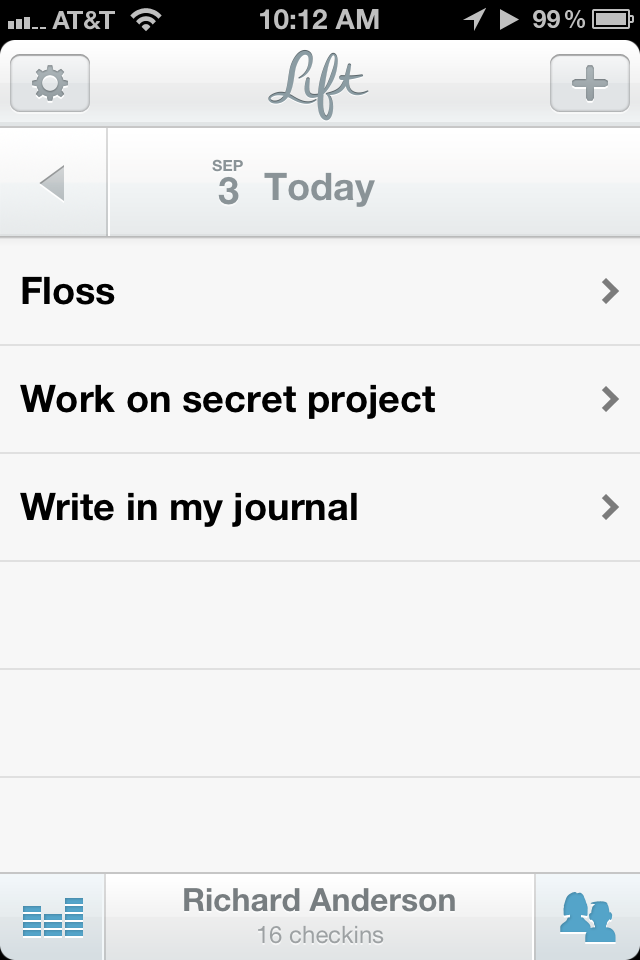 With any application of this sort, there is an easy temptation to load it up all at once with all the little things you want to change about yourself. Having made that mistake before, I settled on starting with only three habits: floss, write in my journal, and work on my secret project. (I will not tell you what my secret project is. It’s secret!) When I tried Lift in beta, the habit list was already populated with a number of habits to try. It’s not clear how to add new habits that aren’t in the list. Typing your new habit in the search field allows you to create it, and new habits are added to the global list for others to start tracking. You may find you’re not the only person out there trying to do an three hours of underwater basket weaving per day. There is no way to re-order the habits in this list, which is both a good and bad thing. It reduces the time you can spend fiddling, but if one habit is less of a concern than the others, you can’t shove it down the list.
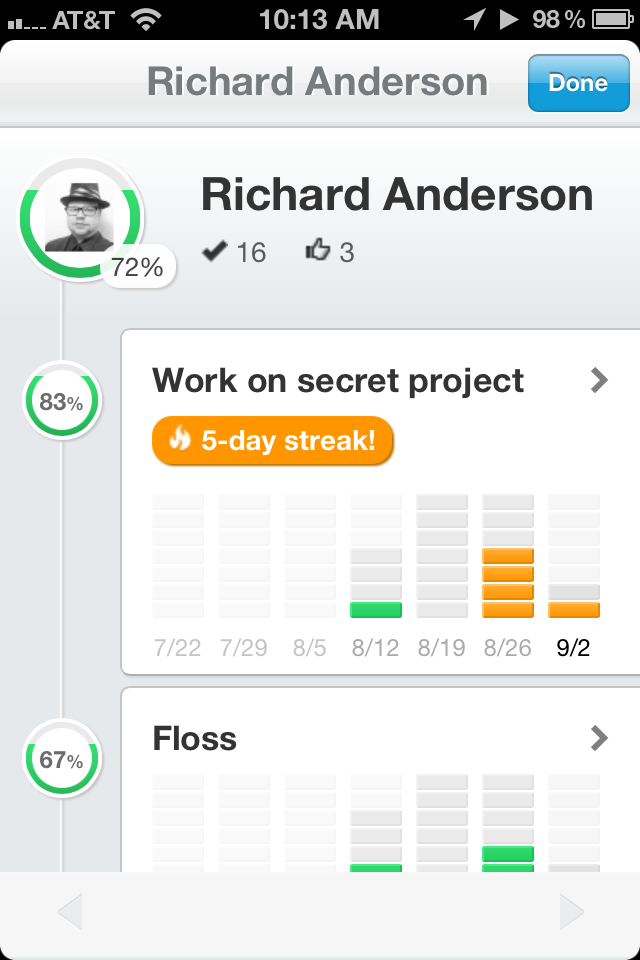 On the main screen, at the bottom-left is a button that allows you to see your stats for your various habits over the last seven weeks. Tapping any habit gives you a more detailed view, with options for a calendar and reviewing your notes. It’s not a feature I use very much, but then again, I’ve only been actively using Lift for about a week, which doesn’t give me much data to display. Everything is represented in a very attractive way, however, and I look forward to the day when I will have a lot of stuff in there to look over. Lift also lets you look at your habit statistics through a beautiful web interface, but actual checkins have to be done with the app.