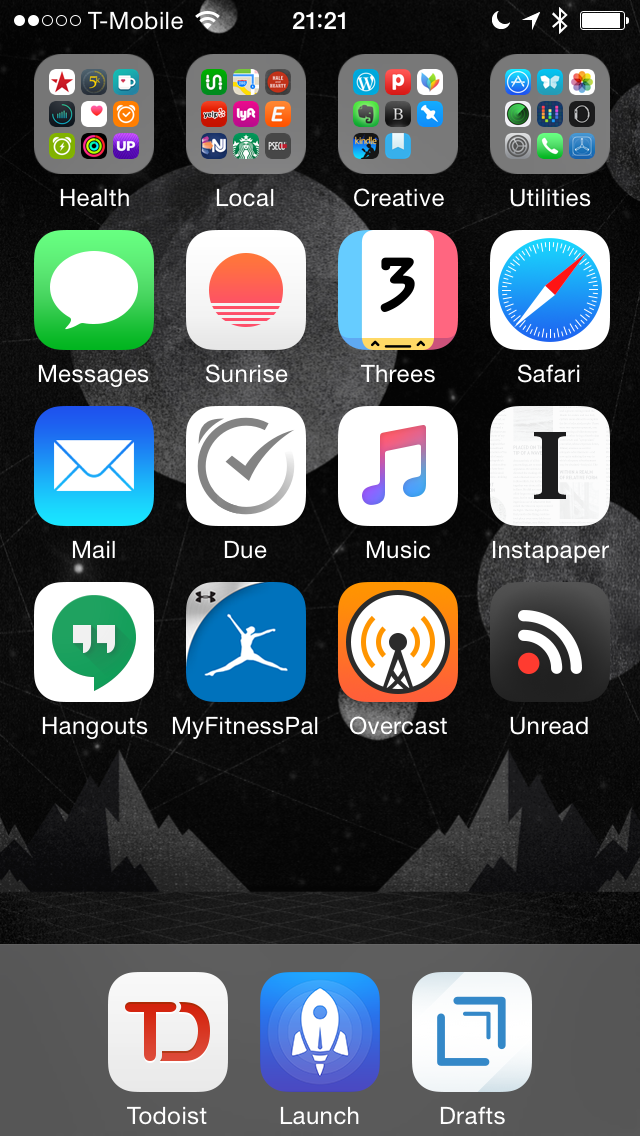
I’m a born fiddler, and in my computing setup, the one thing I fiddle with the most is my iPhone. I switch out apps, rearrange icons, and experiment with various home screen layouts for usability and aesthetics. The only thing that’s stayed the same for more than six months on my iPhone is the presence of Launch Center Pro and Drafts in my dock. Since my Sweet Setup interview, I’ve set up my iPhone in the style of CGP Grey, as explained on the first episode of Cortex. Each icon column is broken out by type of app. From left to right: communication, time and health, entertainment, and reading.
I’m not as ruthless about as CGP about what I allow on my device, but I am trying to be more conscientious about it. I’m also trying to move back towards Apple stock apps. Mail.app is much improved, and the native experience is great. If only there was a way to use gMail aliases with the built-in gMail support. Instead, I have to set up my personal mail as an IMAP account, and manually move messages around. While I try out Apple Music, it’s taken the place of Cesium on my home screen. I have mixed feeling about the service, and I don’t know if I’m going to be keeping it after the three month trial yet. Still, I bet Cesium will be there if I go back.
Since I’m switching back and forth between a Windows PC at work and my Mac and iOS devices everywhere else, I needed a cross-platform task manager. OmniFocus wasn’t fitting the bill, so I went with Todoist. I’m liking it enough that I sprang for the premium option, too. So far, it’s been the stickiest of the various task management tools I’ve tried. I can see why Federico Viticci likes it.
Another major change since the interview is in fitness apps. After the weaknesses of the Pebble as a fitness tracker became all too apparent, I had to rethink my fitness setup, and then do it again after I dropped Jawbone like a bad habit due to some bad software updates. I’m back to giving it a try for insights in my Apple Watch-tracked fitness, but it’s on probation. For caffeine tracking, I’m rolling with Caffiend, and I’m using Sleep Cycle and Power Nap for sleep tracking. And I’m also back into running, with the awesome, Sweet Setup approved Run 5k app. I’m in Week 7 now. I’m not doing any goal tracking, at the moment, though, as I’m not happy with any of the options out there, and I’ve tried almost all of them.
That’s about all the major changes since my Sweet Setup interview: organization, fitness, and no more Pebble. I told you I was a fiddler.
As Apple draws a battle line between themselves and Google over privacy, I’ve heard more than a few people in tech circles spout the same refrain about Google’s monetization of our data. “Google’s not selling your individual data,” they say, “they’re aggregating your data and selling that!” That’s not as reassuring as I think they mean it to be. They’re still collecting my data, and they’re still selling ads to target me—they’re just packaging it all up with other people’s data, and selling it in bulk. The advertisers who buy the targeted info can’t identify me individually, but they have a group of people who are similar enough to me for advertising purposes that it’s saleable.
That’s, at least, what I understand of how Google’s data collection and ad tracking works. Facebook’s system works in a similar way, but they have a more clever way of identifying the specific things I’m interested in. The problem is, I don’t know the extent of both what they’re collecting on me, and I don’t know the extent of what they’re selling to advertisers. Google’s Ads Settings page lets you see the profile Google has on you, including your gender, age, languages, and “interests.” If you haven’t explicitly provided them, it shows you Google’s algorithmic guess. My page comes up empty, because I thought it smart to opt-out of Google’s interest-based ads. If only I trusted it.
At least Google provides something, even if I doubt it’s a complete picture of what they’re packaging and sending. Facebook doesn’t even offer me the courtesy of showing me what it thinks it’s determined about me. I’ve stripped my Facebook profile down to the bare minimum I feel I can get away with and still use the service: my name, my birthdate, my relationship status, and the bands I like. [1] That’s it. Both Google and Facebook, however, track my move online—at least when I’m not using Disconnect. Hell, Facebook even tracks the status updates and messages I choose to not send. They have more data on me than they let on, even after opting-out of everything I can find.
I want to see that data.
Loathe as I am to use the “if you’re not doing anything wrong, you have nothing to hide” argument that these companies—and the US Government alike—use on us, that’s what I’m reduced to. If I shouldn’t worry about the data I feed to Google, Facebook, and a whole holy host of similar companies and services out there, why not be more transparent about what data is being collected, how, and what they know about me? I want to see a simple, clean, human readable page on every service I feed my personal data to that tells me every last piece of information that they know, everything they sell to advertisers, how, and a way to opt-out. If I can’t opt-out, at least show me a way to delete my account—and my data—should I become spooked.
This is fair. This is right. This is my data that I am creating, and I have no way of knowing what is being collected, or how it’s being used, without reading a massive dose of legalese called the Terms of Service. If, as Natasha Lomas claims on TechCrunch, “The online privacy lie is unraveling,” then it is to the benefit of Google, Facebook, et al. to pull back the curtain and reassure us that we, and our data, are not being exploited as much as we’ve feared. That is, unless the truth is even worse than the none-too-comfortable fiction that these companies have created for us. Only one way to find out.
Facebook’s one coup… it’s the only reasonable way to keep up with bands and artists, though I hope iTunes Music will put a nail in that coffin. ↩
So, my Apple Watch arrived last week, and it’s been on my wrist almost constantly since then. I’m liking the device a lot, and the watchOS 2 announcement has me even more excited to be in on the ground floor for the Bronze Age of wearable tech. There’s so much potential in a simple computing device that sits right on the human body, and I can’t wait to see what’s going to happen with it—and see it from the front row.
But, since the Apple Watch started being delivered and strapped on to techie wrists over a month ago, though, there’s been a steady stream of people writing up their thoughts on the device after a day, a week, a month. We even have an Apple Watch breakup letter already. It’s a bit much. Even after using a smartwatch for a month, I had trouble articulating what I found so valuable about the experience. Most of the writeups on Apple Watch, even by better technology writers, are similarly empty. So many words, so few of them adding anything—save for Molly Watt’s piece.
Not only have we not had enough time to see how Apple Watch fits into our lives—even you early adopters who got yours on Day One. My friend Zac Cichy has gushed about how the Watch’s fitness features are going to be a complete game changer for people, or at least himself. I felt the same way about my Jawbone and FitBit, though the research is mixed about their effectiveness. The Watch could change that, but a two months is not enough time to say with any certainty, especially since the Watch is going to change drastically in a few months with native apps.
So, I’m going to take a nice, deep soak in with this thing before writing up how I feel about Apple Watch and its role in my life. I’m thinking somewhere between six months and a year would be enough time. I want to get to know the Watch as it exists now, and then as it will come to be when it has stand-alone apps that define a new experience. I want to see if I’m going to turn off the regular reminders to stand up and move around if I’m sitting too long, or see if the activity rings help me to drop a few pounds. I want to wait until the novelty wears off, both now and when the native apps come, and look back with the perspective of time.
It’s the only fair way to evaluate something with this much potential. Not like I have page view metrics to juice up by jumping on the bandwagon here. The next year is going to be an interesting one, at least in the technology space, but we’ll only be able to see how the landscape has changed if we step back and look behind us. In the meantime, I’m going to ride it out. See you on the other side.
The WWDC Keynote has come and gone, and I’m super excited about one feature in iOS 9 in particular: Proactive. It’s really just a bunch of extensions to Siri and Spotlight, but what extensions they are! The most exciting are the ability to launch apps from the lock screen, chosen by the phone based on what you do, where, and when. So, when I get to the office, I can sit down at my desk and flip open OmniFocusWunderlist, and get an overview of my day. Or, more likely, just dive right into Overcast. When I come home in the evening, and decide to go for my daily run before dinner, it can let me go right into my running app of choice, and queue up my running playlist. Bedtime? It can offer me Sleep Cycle.
Of course, Google Now has offered something similar for years now. It never worked for me, but I did give it an honest chance. Twice, actually. The second time was my great Pebble experiment, as Google Now is exactly the sort of thing a smartwatch was made for. But, after one too many “Hey, you should leave for work now†alerts while I was already on the subway heading into the city, I deleted it with prejudice. I’d rather go without than have one that doesn’t work.
And I’d rather go without than load Google up with more of my data than seems necessary. Which leads to the other awesome thing about the Proactive features in iOS 9—they’re locked to the hardware. Craig Federghi made a point during the presentation that all the Proactive smarts are “done on-device and it stays on-device under your control.†I can see this not just as a boon for my personal privacy, but also as a boost to reliability for someone who spends two hours every working day underground with limited and spotty connectivity. We’ll see which is going to work better, but I’m glad the gauntlet has been thrown.
I’m not opposed to sharing my data for useful services. I’m opposed to sharing that data and having it sold to advertisers, at least not without knowing precisely what I’m giving up. That’s something for a very different essay. Still, with Apple planting their flag firmly in the ground of user privacy and security, I’m more willing to give their service a shot. Proactive looks almost exactly like what I’ve dreamed of… and it’s only the start of what could become a life-changing set of technologies. I want in.
When choosing what apps and services I use, the level of trust I have in the company is weighing heavier and heavier in the calculus. That level of trust is based on a number of factors ranging from trust in the quality of a product, its potential longevity, and—increasingly—whether I can trust it with my personal data.
The trust factor came into sharp focus for me when I tried out Readdle’s new email app, Spark. While it’s a gorgeous, powerful app that I want to like, there’s two things about it that gave me pause. The first is that Readdle stores my login credentials on their server, giving them full access to my email accounts, even beyond the standard Google APIs. The second is that, not long after setting up the app, Readdle had signed me up for an email newsletter.
The situation around Spark storing login information is similar to the launch of Mailbox, which also had similar security concerns. I refused to use the app until it was acquired by Dropbox, which I did trust—at the time. Since then, Dropbox has made decisions that have me questioning the trust I placed in them, and now I’m using iCloud Drive more, and Dropbox less. I don’t use Mailbox at all anymore, and have settled on sticking with the gMail web interface on my Mac, and Dispatch on my iPhone.
Most services and apps I use rest somewhere along a spectrum of trust and utility, much like Dropbox. Any service below a certain threshold, I will not use. Facebook is just on the “will use†side of that threshold. I wouldn’t trust it any further than I could throw Mark Zuckerberg—he may be small, but I’m not very strong—but since almost everyone in my life is on Facebook, I’m sort of stuck. Apple services I trust almost whole-heartedly. While they’re not known for their reliability, that aspect is improving. Sure, Apple services are free, save for extra iCloud storage, I trust Apple not to go peeking to sell my data to advertisers. They made their money when I bought the hardware.
The exception is Google, and I’ve been looking at my Google usage with a more skeptical eye after reading Marco Arment and John Gruber’s recent posts on why they don’t trust Google. I’m not a fan of Google poking through my email, though I use gMail anyway. I put up with it because gMail is the best free solution for email out there, especially in terms of integrations and app support.
In the past year, however, I’ve been moving away from Google as my trust of them wanes. With the release of Yosemite and iOS 8, I switched to using DuckDuckGo as my primary search engine. I only use Google Maps on my desktop when I need transit directions. I use Google Chrome only for sites that require Flash, or as my browser for day job related tasks. [2] This leaves gMail and Hangouts. I’m tied in and comfortable, and don’t think I’ll switch yet, but I have updated various online accounts that use my gMail address to my sanspoint.com email, in case I decide to jump ship after all. $40 a year for Fastmail doesn’t seem terrible.
You can say “If you’re not paying for it, you’re the product†all you want. It doesn’t change that many of the best, or at least most useful services on the Internet are ones you pay for in data instead of money. If you’re getting enough back from the trust you put into those services to respect you as a user, to keep your data secure, and to keep you happy, then it’s time to find greener pastures—even if you have to pay for it.
And that’s the other part of the trust problem that often gets ignored in these discussions: not everyone can afford to use services they can trust. At least in the United States, you can pay quite a bit just for an Internet connection. I’ve paid, on average, $35/mo for home Internet, and another $90/mo for cell service (with voice and texting). That adds up to $1,500 a year for connectivity. I’m gainfully employed, and live in an area with decent enough options for Internet service. For many people, that’s more than they can reasonably afford—and asking them to drop more on top of that for the nebulous benefit of “trust†is pushing it. It’s a point I’ve made before, but bears repeating.