Though since iOS 8, if not some time before, I slipped out of using many of the cool automation shortcuts I’d built for myself. Much of what I’d set up to move data around were obliviated by the new features in iOS 8 and apps that took advantage thereof. Why copy a link from Safari, switch to Launch Center Pro, and tap an action to send it to my Pinboard client, when I could just do it from the Share Sheet. Launch Center Pro just became another home screen, Drafts just a place to collect notes. The release of Workflow left me thinking about the potential I was no longer tapping into, beginning with Drafts, and in no small thanks to Dr. Drang, as well.
Drafts is now the starting place for all things involving text on my iOS devices. Writing an essay? It goes into Drafts. Writing a note for later? Drafts. Writing a Tweet? Drafts. Capturing tasks? Drafts. Sending an email to my boss on the go? Drafts. Searching the web? Drafts. I have a whole section of searches that I can summon from a Drafts action screen, replacing a bulky Action Group in Launch Center Pro. It’s a natural place to do things with text, because it launches quick and lets you start typing right away. The only text-related thing I’m not using Drafts for is searching logins in 1Password. That is staying in Launch Center, for now.
The trick to making these powerful, and intimidating apps work, is to decide on the role they’ll play on your devices. For me, Drafts is where I type things to deal with later. Launch Center Pro is transitioning into a place for quick actions and deep jumps into apps. If I want to call my folks, I’ll do that with two tap in Launch Center Pro. Workflow is the glue that ties various features of my iOS devices together, and I can summon up its power from within Launch Center Pro, as an App Extension, or icons on my Home Screen, depending on the workflows I set up. The whole thing is still a work in progress, but if I’m going to get the most out of my investment in these apps, I need to spend time thinking about what problems they can solve for me. So far, that thinking’s paying off.
People love to look at home screens. The current wave of interest may have started with Episode 11 of Connected, at least among the indie tech writers and podcasters I follow, but the launch of Betaworks’s #Homescreen app has way more people talking about what’s on their iPhone home screen. It got [the crew of Accidental Tech Podcast to post and talk about theirs](and how they organize them.). Hell, even I posted my home screen with #Homescreen, [1]mostly because I’m a sucker for an easy to climb on bandwagon. Plus, #Homescreen is way easier to use than homescreen.me, and lets you identify the apps.
This isn’t a new phenomenon. The site First and 20 was posting the home screens of famous tech folks as far back as 2009, though stopped around the time Apple went to a phone with 24 app slots. David Sparks runs an ongoing series of interviews about home screens, going back almost as long. David, and his co-host Katie Floyd, even did a deep dive on their home screens on the latest Mac Power Users. Home screens are also common parts of interviews over at The Sweet Setup. Even when meeting fellow nerds in real life, we’ve swapped phones to check out home screens.
And I can’t get enough.
What is it about people’s home screens that intrigues us? In part, it’s a peek behind the curtain of people’s lives. When you see people’s phones—if you see people’s phones—you often see them running an app. If my morning commute is any indication, it’s usually Candy Crush. A home screen reveals someone’s priorities—the tools or toys they want immediate access to on a daily basis. These little rectangles in our pockets are capable of being so many things, the few we choose to give primacy says a lot about us. How we organize them—or if—says just as much.
Oh, and there’s the discovery thing. It’s hard enough to find apps in the App Store. To see the icon of something you’re curious about on the home screen of someone you admire is an endorsement. To see an icon you don’t recognize is a call to explore. I’m trying to get better at not installing apps without thinking about their utility, but I still can’t resist something shiny that could help me get more out of the screen in my pocket. As vices go, it’s a comparatively minor one. A voyeuristic desire to learn about other people, their relationship with their gear, and what I can take away from it a bad thing.
Silicon Valley strives to “revolutionize†and “disruptâ€, but are their many “revolutions†and “disruptions†actually all that significant? Were they absolutely inevitable? Were they necessary? And are people happy to perpetually accomodate these new technologies?
I’d say no on all counts. And I certainly wouldn’t consider a vast majority of technological innovations revolutionary.
There’s a popular image of Silicon Valley as a place where the future is made. After all, it birthed the microprocessor, the personal computer, the GUI, and the iPhone. The problem is that all but the last of those children of the Valley happened during the 60s to the 80s. Since then, it’s coasted on its reputation, and the occasional good idea—if not a “good” idea, at least a commercially successful one. With the rise of Startup Culture over the past few years, that image of Silicon Valley is being replaced by one of young people creating new companies that raise obscene amounts of Venture Capital funding to be bought out by Google, Facebook, or Apple. They’re not making microprocessors or iPhones, they’re making silly apps that get huge user growth, and promoting them with “disruption” or “revolution.”
No wonder tech news has become either boring, or an outrage factory.
This is why Silicon Valley is such an uninteresting place. Its culture is one of future worship without purpose, ever driven by the idea of the next development without any regard for whether or not it’s worth being developed. Silicon Valley is in the business of validating delusions while earning as much money as possible, even if its product is detrimental to the various communities who use it.
Here’s where J.D. and I differ. I don’t think the Valley worships the future, so much as they worship the investment cycle. The culture’s not about the idea of the “next development” as much as it’s about making a big win for your investors. This explains the “sharing economy” startups that hire contract workers for abysmal pay, so they can drive their numbers up and raise their valuation. You can’t tell me that Homejoy doesn’t know that charging $25/hr for cleaning a house isn’t a sustainable model. What looks like “future worship” is little more than marketing spin to get VCs to open their checkbooks, and customers to give up their data.
There are people using technology to solve real problems and do interesting things. Whatever your opinion is on Elon Musk, Tesla is creating real “disruption” in the automotive industry by making electric cars that people actually want to drive, unless you’re the sort of asshole who likes rolling coal. Which is why you have established business interests trying to keep them from selling cars. That’s disruption, not the crap Uber is pulling. [1]
That said, it’s a mistake to think you can solve a problem, or make people’s lives better by just throwing an app, or a piece of hardware at it. I don’t know if the rise of “[s]mall businesses who use traditional methods and local resources, who want to make quality products from the best materials.” is as much a frustrated reaction to technology not living up to its marketing spin as it is a rediscovery of our abilities to do things by ourselves. If it’s the latter, then it’s a rise enabled by technology that allows us to share knowledge of skills. Plug any skill you want to learn into YouTube, and you’ll come across someone willing to teach it. And this includes making real things, not just apps.
If that’s the real revolution, then it’s something we can credit, in part, to Silicon Valley, albeit the Silicon Valley of the late–80s and early–90s. If you want to talk about a technology people have been happy to adopt, I’d put the Internet at the top of that list. We can haggle on the pros and cons of that happy adoption, especially around the omnipresence of it in our pockets, but there have been quite a few positive outcomes. Though “revolution” might be the wrong word to describe this—as might be “restoration.” “Renaissance” might be correct, in the sense of a rebirth or renewal of some old ways of doing things, aided by technology. If so, it’s something I’m excited to be a part of.
As an urban dweller, I’d like to see a startup try to improve public transit, not put more people in cars, but I don’t think there’s any money in it. ↩
Another new batch of iPads, another cycle of tech pundits determining what these new iPads—and their discounted, previous model brethren—mean for Apple and its customers. In short, Apple’s going to make a buttload of money. I’m more interested in what the iPad means for myself as an iPad owner, and my plans to upgrade. I have a 3rd Generation iPad, the first model with the Retina Screen, and the one that many describe as compromised. It’s thicker and heavier than the iPad 2, and it does get pretty warm at times. On top of that, the A5X processor is taxed enough by iOS 8 that my iPad now lags on simple tasks.
When I bought my iPad, the plan was to use it as a test bed for retina web graphics. It served that role well when redesigning Sanspoint. It replaced my Kindle for reading as the Retina display was so much easier on the eyes than my old Kindle Keyboard. Though after realizing the effect the blue light was having on my eyes when I read at night, I switched to a Kindle Paperwhite for most reading. That left it as a portable writing device, but that ended when I stopped going to my weekly writing group. I stopped attending that, because it was a pain in the butt to get from work, to the gym, to 62nd and Broadway. Also a pain in the shoulder: a bag of workout clothes, an iPad 3, and a bluetooth keyboard were heavy.
So, my iPad stays at home for the most part. I could try doing what Ben Brooks does, with keeping my iPad open on my desk to take notes, but I just don’t work that way. If I’m going to keep something on my desk to take notes, I’d prefer a paper notebook. Less friction, and less worry about battery. I don’t like using my iPad for pure content consumption, either. For videos, I have my giant monitor hooked up to my MacBook Pro. For books, there’s the Kindle. I can read comics and RSS feeds on my iPad, but ComiXology is a chore to use since the Amazon acquisition, and I can read RSS anywhere.
What keeps me from using my iPad for all these things? Friction. I’ve spent over half my life with a keyboard and mouse, tethered to a desk. I rolled with a desktop and laptop setup for a while in college: taking my iBook G4 to class, while my Mac mini sat on my desk. Before that, I did the same thing with a custom-built PC, and a school-supplied ThinkPad. Those were the days. I could do that with my iPad. It sure weighs less than my iBook did. Problem is, I have a computer on my desk at work. It’s a crappy Dell laptop, but it’s still a computer. There’s little I can do on my iPad at work that I can’t also do with the computer, and now that I’m using Trello to manage my work tasks, I don’t have to use my iPad as a separate task manager—and I don’t know what else I’d use it for at work.
Which brings me back to those new iPad models. I do use my iPad 3 enough that its iOS 8 related lag has become a problem. My plan was to pick up a new iPad mini after the holidays, and see if the smaller size and lighter weight were enough to get me to use it more. If I found the size of the mini to be more of a detriment, I could just take it back to the store and get an Air. Apple’s decision to give up parity between the mini and the Air this cycle has thrown a wrench in this plan, albeit a small one. The power of the iPad Air 2 excites me, both in terms of processing, and the extra gig of memory it has over previous models. But, will I use it? I just know it’s good for future-proofing. I might still get an iPad mini 3, though is the extra $100 for TouchID worth it? [1]
The most important question is whether I really need an iPad at all. Perhaps, I should change my plan. Instead of buying an iPad mini, and exchanging it for an iPad Air, I should buy an iPad mini and see if the size and weight issues are really what keep me from using an iPad. If that’s the issue, then I can comfortably roll with the mini until its limitations become obvious. If the iPad mini ends up just staying at home, with its Smart Cover closed, except for the occasional game of Threes!, or whenever I remember there’s a new issue of Sex Criminals… well, that’s what Gazelle is for.
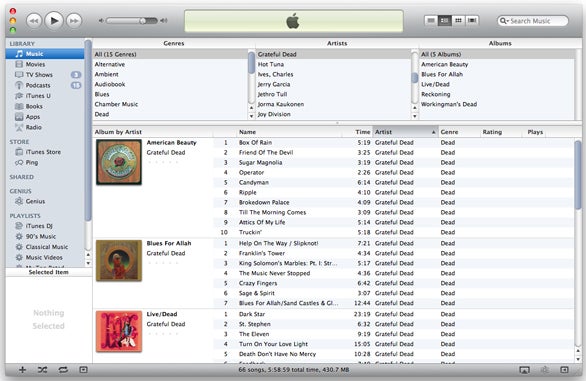
Another new version of iTunes, another round of whinging and complaining about the changes to the interface. People have been griping about iTunes since the days in which it was a big, chunky Brushed Metal app. Supposedly Bono told Steve Jobs that iTunes looks like a “spreadsheet” back in 2009, but the most dramatic criticism came with iTunes 9 and the “Grid” view for albums becoming the default view, along with the removal of the sidebar (as a default) in iTunes 11.
I don’t get the hate, to be honest. iTunes has problems, and I’ll get to those later, but the interface isn’t one of them—at least for me. iTunes does what a media player should do, which is to play music, organize music, and get out-of-the-way. In an informal, to say the least, survey on Twitter, the organizational side of iTunes is where it seems to fall down. I don’t see it, especially as picky as I am about how my music is organized. [1] Organization is a set it and forget it operation. Clean up the tags, set your sort options, and forget it. There’s ways to improve how iTunes handles editing metadata, but it works well enough. I don’t expect Apple to incorporate something like MusicBrainz into iTunes any time soon.
Maybe I just don’t do stuff in iTunes that runs into the same issues as the complainers. I don’t mess with playlists much, or use iTunes for much in the way of non-audio media. For me, my iTunes workflow is based on patterns I developed in the Physical Media days. Back in high school, way before I got my first iPod, my way of putting on music worked something like this:
“I would like to listen to some Pink Floyd…”
*Opens his CD binder to the Pink Floyd section and flips through*
“Oh, Wish You Were Here! That would be good.”
*Puts CD in player and proceeds to listen*
In iTunes, I decide on music in much the same way.
“I would like to listen to some David Bowie.”
*Cmd-Tab into iTunes and type “Bow”*
“Hm… Scary Monsters (and Super Creeps) would be good right now.”
*Double-clicks on album, and enjoys the music*
iTunes current UI works perfectly for that. I infinitely prefer the “Grid” view to the old column browser. Maybe I’m just visually oriented when it comes to selecting albums. I’m often as anal about album artwork (perfectly square, at least 500×500 pixels, larger if possible), as I am about my tags. I enjoy scrolling through the little squares of album art, finding the artist I feel like playing, and choosing the album. It’s visceral in a way that the boring old Column Browser isn’t. When it comes to organizing music, iTunes 12, with the “Recently Added” section at the top of the “My Music” view makes sorting and tagging new additions to the library easier, too.
iTunes still has problems. It’s still a Carbon app, with all the modal dialogue boxes and performance issues that implies. It is a bit heavy, though I’m not sure I agree with those who want to take a jigsaw and split it into component apps of Store, Music, and Movies like on iOS. Device management, especially trying to organize apps within iTunes is a pain in the butt, and Wi-Fi sync is still flaky. These are all issues, but they’re not ones that get in the way of using it as a media player.
If there’s an Apple media app that deserves UI criticism, it’s Music on iOS. Since iOS 7, the Music app has been frustrating and borderline unusable for me. I tend to listen to one album at a time, though if I go to select an album in Music from under an artist listing, it’ll play through that artist’s entire discography by album—in alphabetical order, no less. Sure, I could rotate my phone into Landscape mode and pick from the sort-of Grid View there, but that just lists every album on your device alphabetically, which doesn’t jibe with how I organize my music at all. Reverting the layout of the app to iOS 6 would go a long, long way to making my life easier. Instead, I’ll just use Ecoute.
In the meantime, if someone can explain in a little more detail where iTunes falls down for you as a way to play and organize music, I’d love to hear it. I just know it works for me.
Alphabetical by artist, album sorted by year of first release within artist. I also use sort tags, so artists end up alphabetized under their last name. I grew up in a library, okay? ↩