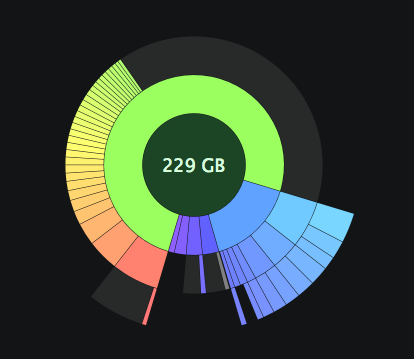
The Saturday morning before my big move, I woke up to find the external drive I keep all my media on: music, movies, books, TV shows—my entire iTunes library—had died. My first thought that I really didn’t want to spend the money t replace it. Recovery wasn’t a concern. Everything had been backed up to my Time Capsule. The worst that could happen would be losing the last couple albums I imported into iTunes, but that wasn’t the case. All I had to do was replace the hardware. I ordered a 1TB USB drive from my local Apple Store. After recording that week’s Crush On Radio, I picked up the drive, ran home, and started restoring.
The process took the entire weekend, largely due to the sheer size of my library, and a few false starts. The experience has forced me to think about why I have such a massive media collection. What compels me to hold on to all of this stuff? What compels me to get more? Is it some sort of psychological disorder? The most insidious thing about hoarding files is that it’s largely consequence free. If you’re a digital hoarder, you don’t have to worry about the same problems that come with real objects. No matter how many MP3s or ePubs I have, they’re not going to collapse and crush me to death. [1] Hoarding MP3s doesn’t make for the kind of compelling visuals that suit an episode of Hoarders.
Pretty, but it doesn’t make for compelling television.
At least when it comes to music, I have some justification. I’m an avid music fan, music writer, host a music-related podcast, and I am a completionist. When I like a band, I want everything by that band, or as much is feasible. In the world of collecting physical goods, one is limited by budget and availability. Some stuff is outright rare, and if you want it, you’re probably going to have to pay through the nose. The Internet puts almost anything we could possibly want at our fingertips. With a fast enough connection, the complete discographies of artists are at our disposal in minutes. All you sacrifice is the actual, physical product. Since I’m the sort of person who actually listens to music, albeit a lot of the same music over and over, this is fine with me.
On the second episode of Crush On Radio, we briefly discussed our digital music collections and how we managed them. Before Crush On Radio even started, I had tried to do some pruning of my collection, but now every week at least one album’s worth of material gets added to the library. I’ve also been lax at purging the stuff I don’t like. I rarely get a chance to get back to the albums I downloaded to check out and never have. Last year, I got the latest album by Cut Copy, Zonoscope, but only finally listened to it a couple months ago. It’s an amazing synthpop album, and I love it. Unfortunately, I haven’t played it since, but I probably will, in time. Perhaps it’ll be a pick on an upcoming Crush On Radio
However, I’ve never been a huge movie person, with the exception of Wes Anderson movies. This makes the large movie folder on my media drive all the more absurd. Why then do I have so many movies I’ve watched once—or never—taking up space? Laziness, no doubt. About the only evergreens in my movie collection are concert films. [2] It’s much the same with the piles of unread e-books and unwatched TV shows. As much as I’d like to catch up with Doctor Who, I’m only at the start of Series 3, and only getting further behind. The only TV series I like an am up to date on is Boardwalk Empire, and that’s because I got in at the start. Even the shows and movies I have watched sit around, and I don’t know when, or if, I’ll get around to watching them again. More to the point, why bother keeping them when I can stream them on demand through means legal and otherwise.
What I have to do is re-evaluate when, where, and how I consume media—especially music, and be more judicious in what I acquire and when. Also, I have to be more judicious in what I purge. If I’m unlikely to go back to something, why keep it around? No matter how big my media drive is in capacity or small in package, its contents take up non-physical space in my psyche. I see the cover art as I scroll through iTunes. I am nagged by the empty space under “Play Count†when I click them, and try to decide if it’s truly what I want to listen to, or not. What gems are sitting there that I’ve missed? More importantly, perhaps, what junk is sitting in there that is not going to be worth my time at all? As I figure all this out, I expect to revisit this topic. If you have any suggestions, reach out.
Two weeks ago, I received an invite to the beta of Lift, a new iPhone app for goal tracking and changing habits. There’s no shortage of apps that promise that, with their use, you can achieve any goal. I’ve tried Streaks, Ritual for the iPhone, as well as Joe’s Goals on the web, and a few others with various levels of permeability, and intrusiveness. Lift is among the least intrusive of the various apps I’ve tried, and yet in the last two weeks—though mostly in the last week—it’s been working well. The final release hit the App Store a few days ago, so let’s take a look.
First Impressions
Lift is a pretty app. The main screen is rendered in lovely soft shades of white and gray with a little bit of soft blue on the buttons at the bottom. On the main screen, checked in habits are a shade of green. Elsewhere in the app, a shade of orange is used to draw attention to your streaks and other good things. Pretty as it is, I can’t help but think the developers all had white iPhones to test it on. The Lift website shows the app running on white iPhones where it looks a lot nicer than it does on my black iPhone—not that it doesn’t look good on black. The app icon is also attractive, and sits well on my home screen. There aren’t a lot of nice, white icons on my phone, though I’ve ended up with three white icons of varying attractiveness on my home screen. Lift’s is the prettiest. (Sorry, Instapaper.)
Using Lift
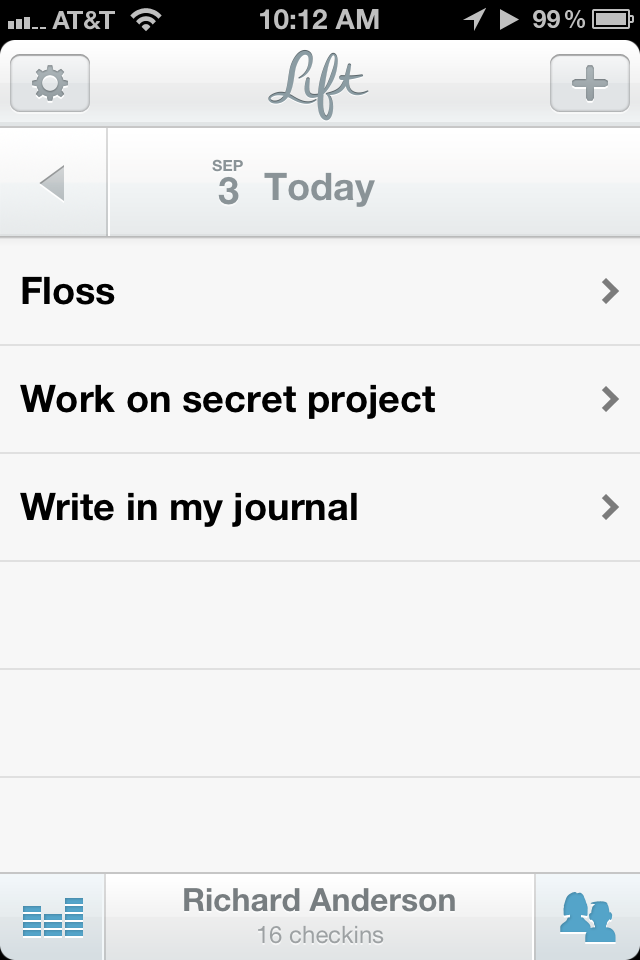
With any application of this sort, there is an easy temptation to load it up all at once with all the little things you want to change about yourself. Having made that mistake before, I settled on starting with only three habits: floss, write in my journal, and work on my secret project. (I will not tell you what my secret project is. It’s secret!) When I tried Lift in beta, the habit list was already populated with a number of habits to try. It’s not clear how to add new habits that aren’t in the list. Typing your new habit in the search field allows you to create it, and new habits are added to the global list for others to start tracking. You may find you’re not the only person out there trying to do an three hours of underwater basket weaving per day. There is no way to re-order the habits in this list, which is both a good and bad thing. It reduces the time you can spend fiddling, but if one habit is less of a concern than the others, you can’t shove it down the list.
All your habits appear in a list on the application’s main screen. Tap one, and you see a big button with a checkmark, and a little chart of the frequency of your checks per week for the last five weeks. Below that, there’s a list of the checkins of other people working on the same habit. If you so choose, you can scroll through and tap a little “thumbs up†icon and give “props†to your fellow self-improvers. Checking in adds you to the list, and the “thumbs up†icon is replaced by a pencil icon, to let you write a quick note on your check in. The “props†feature is nice, though I don’t use it much. As for writing notes on your checkins, it took me a few pokes in the app to discover the feature. I don’t think the global list is the best place for that icon, but that’s a minor issue.
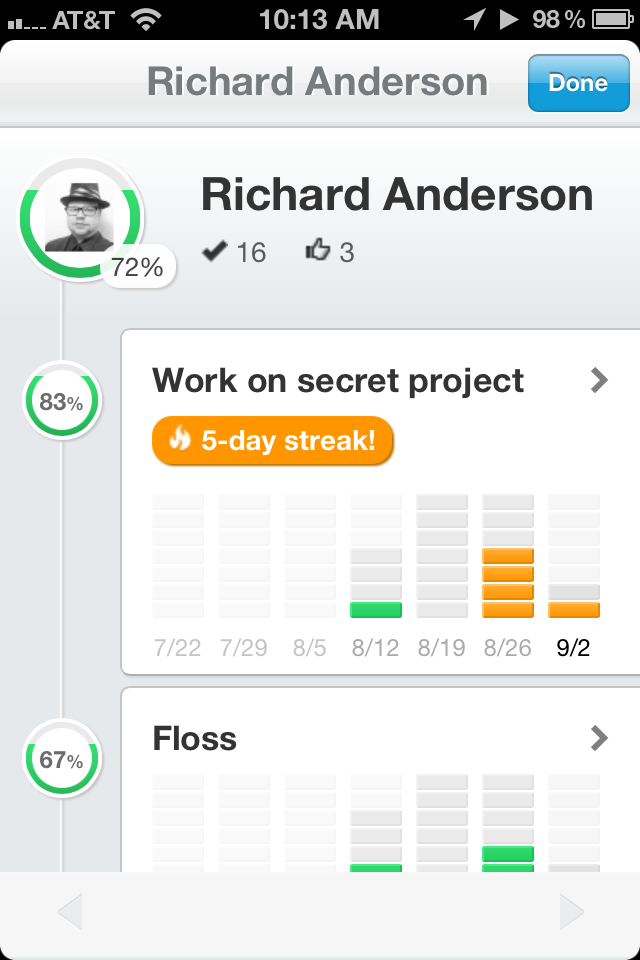
On the main screen, at the bottom-left is a button that allows you to see your stats for your various habits over the last seven weeks. Tapping any habit gives you a more detailed view, with options for a calendar and reviewing your notes. It’s not a feature I use very much, but then again, I’ve only been actively using Lift for about a week, which doesn’t give me much data to display. Everything is represented in a very attractive way, however, and I look forward to the day when I will have a lot of stuff in there to look over. Lift also lets you look at your habit statistics through a beautiful web interface, but actual checkins have to be done with the app.
Notifications and Alerts
What notifications? What alerts?
This is not a shortcoming. I mentioned before about “alert fatigueâ€, and so Lift’s lack of alerts comes as a refreshing relief. Lift makes you come to it, and that forces the user to have a certain degree of mindfulness that more aggressive applications don’t cultivate. I’m more inclined to blithely ignore a notification to review my day and check in if it pops up in the middle of my winding down period at night. Lift’s attractiveness and user-friendly interface compels me to use it in a way that a number of previous applications have decidedly not.
Social Networking
It’s been said that the more people you have supporting you in a life change, the better your chances of succeeding. Lift allows you to tie it in with Twitter through the built in iOS 5 Twitter integration, and with Facebook. However, the social features are limited to just pulling in your profile pictures. Lift does not tweet or update Facebook statuses. You can invite friends to use the app, but it doesn’t pull contact information in from any of your social networks, or even the iOS Address Book. I approve entirely of this. Personally, I do not like application posting to my Twitter or Facebook accounts, unless I explicitly tell it to. Props to Lift for keeping things private. Hopefully it’ll stay this way in later updates. Thankfully, you do get the support of all the people using the app, stranger and friend alike.
Is It Worth It?
Lift suffers from the same potential pitfall that all of the other applications in this genre suffer from: the human factor. While it’s the prettiest, and most frictionless of these applications I’ve tried, it does me no good if I neglect it. It has made its way from my second home screen to my primary one, and I’ve been launching it daily before I wrap up for the evening. What worries me is that, one day, the novelty of the application will wear off and I’ll be back where I was before. This is a problem with me, not with Lift, and hopefully I can overcome it. I do feel really good about Lift helping to keep me mindful, however, in a way that none of the other applications I’ve tried have.
Another point of concern is that Lift is a free app, and I wonder how they plan to keep it going and make money if it succeeds. For something this attractive, I would have happily spent anywhere from $.99 to $2.99, and given serious consideration to spending up to $4.99. If Lift went the ad-supported route, I’d probably keep using it, but I can’t imagine ads being integrated well into the gorgeous interface. If the people behind Lift can keep things going, long-term, I can see myself using it for a long, long time. You can get lift in the App Store for free here. Pick it up, and support them.
In this corner, costing $39.99 and wearing purple trunks, please welcome the 800-pound gorilla of task management, the titan of to-do lists, the giant of GTD, OmniFocus!
And in this corner, costing $49.95 and wearing blue trunks, please welcome the little app that could, the tortoise to the hare, fresh from a four-year nap and ready to sync, Things 2.0!
Alright. I want a good, clean fight. No hitting below the belt, and no violating Apple’s sandboxing rules.
*ding, ding*
Quite literally a couple of months ago, I switched from Things to OmniFocus. This was not done lightly, as I’ve tried OmniFocus in the past, and couldn’t make heads or tails of it. With this latest attempt to make OmniFocus work for me, I at least managed to keep my head above water for a time. This was probably by virtue of using the iPhone app first rather than diving into the deep end of the Mac app’s absolutely confounding and endlessly fiddly interface. Instead of staring down a blank, intimidating void, I was able to acclimate to OmniFocus though the gentler, more obvious iPhone interface. I even managed to recover from a database sync disaster early on with no outside help. Once I started using the Mac app heavily, however, I began to feel overwhelmed.
One thing I’ve learned about myself in my brief time on this planet: if you give me something to fiddle with, fiddle I will, often to the detriment of getting anything else done. OmniFocus has endless ways to fiddle. I can add start and due dates set down to the minute, tweak contexts to be super-granular and location-aware, hook it up with Siri, set up perspectives to get a different view of things that need to be done, script it and use templates, customize the theme… There’s so much that can be done to get stuff into OmniFocus and have OmniFocus nudge you to do stuff. It’s the Swiss Army Knife of task management applications. Sure, you can use it to whittle, but even as you whittle, the corkscrew, fish-scaler, tweezers, magnifying glass, bottle opener and other geegaws are there to tempt you.
Things is much, much simpler. It’s not as simple as some apps, but compared to OmniFocus, it’s a breath of fresh air. It may be that I lived in Things for so long, but opening it up again and seeing the soft, slightly textured blue-gray window felt like coming home after a long journey. Well, coming home to a house where I had forgotten have the mail and newspaper delivery held, as a bunch of my repeating tasks—bills and errands, mostly—had piled up. First thing I did was clean up. I’ve opted to start over from scratch this time, and hopefully get my system right and avoid the pitfalls that made me want to switch away in the first place.
One of the problems I’ve had with Things and OmniFocus is figuring out what goes in there. Is my list of artists and albums to check out for future Crush On Radio picks a project? Books to read? Post ideas for Sanspoint? Does any of these belong in my task manager? If so, how do I organize it? These are fundamental problems of any GTD system, and I’m going to be wracking my brain to figure out a solution for a while. For the time being, endless lists like this will end up going into my system in some form, once I can establish a method for doing so. In fact, this is one of the areas where OmniFocus does beat out Things—there’s the option to set a project as merely a list of unconnected Single Actions [1] with no “completion” state, which served as good buckets for lists like that. Things is a bit less structured, but the “Areas of Responsibility” feature might make for a good substitute.
Things is also a little more nebulous with regards to GTD’s Contexts. [2] OmniFocus is built around a canonical GTD view of Projects and Contexts. Actions are part of a Project, and assigned to a Context. All actions can be viewed in relation to either Contexts for the actual implementation phase, or Projects for review. Things doesn’t have any specific implementation of Contexts. Instead, there’s the “Areas of Responsibility” which can house projects and actions, though an action housed in an “Area of Responsibility” cannot also exist as part of a project. This is mildly infuriating. I’ve taken, this go around, to using the application’s tagging feature to add contexts to actions, which feels like a serious kludge.
What I have to figure out, when it comes to these potential trusted systems, is which allows me the least friction not only in getting my stuff in there, but processing it and doing the work. It’s easy to get stuff into OmniFocus, but it’s hard to process and organize that stuff due to both the friction inherent in the interface and my own endless desire to fiddle and futz to get my tasks organized just right. Things is slightly less flexible in terms of getting stuff in, but so much easier to take what’s already in the app and process it. The final part, the actually getting things done part of GTD, is something that can’t be fixed by software. My hope is that if I can reduce the friction of getting stuff where it needs to be, I can reduce the friction of actually doing what needs to be done.
GTD Parlance for tasks that are self-contained and not part of a larger project. ↩
The general GTD definition of a Context is a location, tool, or person necessary to perform a task, e.g., the office, the phone, your boss, etc. The original canonical GTD definition was more tied to physical location, but technology has ruined that. ↩
My primary machine is, to borrow the parlance of Andy Ihnatko, a 2008 White MacBook Nothing. It was my college graduation gift, outfitted with the fastest processor and biggest hard drive available on the model, but the base 2GB of RAM, which I upgraded to the max of 4GB on my own. It’s gone from Leopard to Snow Leopard to Lion without a hitch. I’ve had no show-stopper issues, just a swollen battery that the Apple Store swapped for me without a question. Four years later, however, and it’s finally showing its age a bit. It has three problems that have me moaning a bit with the unfulfillable desire to finally upgrade.
The backlight inverter needs to be replaced. As this is my only machine, I’m unwilling to part with it for however long it would take for a Genius to replace it, and it’s an arduous enough repair that I’m unwilling to do it myself. Fortunately, keeping the brightness at about 50% keeps things going.
Since starting Crush On Radio, I’ve been doing some heavy-duty audio editing every week, and it’s been a bit of a chore to do. Performing tasks like Normalization, Compression, and MP3 conversion on a sixty to ninety minute podcast can easily take up about half the actual time spent editing. A faster machine would easily cut down on the time needed.
It can’t run Mountain Lion. At least, it can’t run Mountain Lion easily, or in a supported configuration that’ll make updates and things sane.
I’ve been lusting after the new, 15-inch Retina MacBook Pro, but even if I could afford an upgrade right now, I couldn’t swing that. [1] I’ve also lusted after the 13-inch MacBook Air, but I’m not sure that its svelteness is suitable for how I work, which is with the laptop latched to a 22-inch external display. Of course, I’ll be putting the giant display in storage in a couple weeks and living back in the space of a 13″ display again, soon, so we’ll see how that works out. Either way, some of the same problems that have me disregarding the Retina, even if I could afford it, have me disregarding the Air. If I had to upgrade, I’d have to go for a 13″ Pro, and even then… I just can’t swing it with the move coming.
So, I’ll make do.
The last major hardware upgrade I made was to the iPhone 4S from the iPhone 3GS. I made it because I could easily afford it, my contract was up, and my 3GS had taken some battle damage to the headphone jack in a failed mugging attempt. [2] I had considered just replacing it with an iPhone 4, because I knew I really didn’t need Siri or the fancy camera, but I did need at least 32GB of storage. With the 32GB iPhone 4 unavailable, I went for the 4S. In about a month, if the rumors hold true, the iPhone 5 will be released. It’ll have a bigger screen, LTE, a new dock connector and probably a surprise “One More Thing” feature that’ll set me to drooling. I will not upgrade.
For what it’s worth, I don’t have an iPad either—even an original model iPad. When the new iPad came out, and the iPad 2 went down to $399, I considered getting one for about five minutes, then disregarded it because I have no place for it in my life and workflow. That’s not to say I wouldn’t find a place if I had one. I’ve been told that the iPad version of OmniFocus is probably the most user-friendly of the bunch, and I’d love to give it a try. It would be nice to have a big, backlit screen to read Instapaper articles and Kindle books on. I could sit on the couch and write. I’d find a reason to use the damn thing, but as it stands, between my MacBook and my iPhone, I don’t have a compelling usage case for an iPad so that’s $600 I don’t have to spend.
The point is, the tools I am using are enough. They work fine, display issues with my MacBook aside. Even though I can’t upgrade to the latest, greatest version of OS X, it doesn’t look like there’s any compelling reason to do so on the application side. Without that compelling reason, why bother? The latest episode of the Enough podcast drives that point home. For myself, it’s a cost/benefit analysis question, where the cost is something I can’t afford, and the benefit is something that would be tangible in a certain aspect of what I do, but not tangible enough to make me make the jump.
If I had to finally put Madame Psychosis [3] out to pasture, what I would find myself looking at for an upgrade are the refurbished MacBook Pros. No, they won’t be top of the line out of the box, but they’ll serve my purposes well. My first Apple laptop was a refurbished iBook G4, and it was so reliable that when the internal fan failed, I didn’t notice for months. Thing was a tank. If the Intel transition hadn’t happened almost immediately after buying my original Mac, I would probably have kept my first mac, the old G4 mini, and my iBook as my primary machines for longer than I did. They were enough to keep me going through three years of college, which is saying something.
Good as new for less, is better than new for more. The tools I need are tools that are good enough to last and powerful enough to do what I need to get done. I’m willing to pay what it requires to get something that can and will last. Sometimes you should spend a little more, and sometimes it’s worth saving up. I’m going to move, find a job, get an apartment, start my life up in a new place, and when all that is done, start putting the money aside to buy a new MacBook. Maybe by then, they’ll have Retina displays in the MacBook Air. Wouldn’t that be sweet?
I consider my iPhone to be my second brain. Some would even argue its my first brain, but let’s not go into that. My iPhone remembers phone numbers, my calendar, and the items on my to-do list, but this is nothing new. Increasingly, I’ve taken to using it to remind me to eat better, to go to bed and wake up at a reasonable hour, and make sure I get enough sleep. It tracks every step I take to make sure I get some exercise during a twelve-hour work day spent mostly with my butt in a chair. It reminds me when my bills are due, and thanks to Siri, all I have to do is ask and it reminds me of anything on my mind I’ll need to remember later. My iPhone is, in many ways, the superego I lack. It’s my Skinner Box, offering myriad forms of behavioral reinforcement techniques.
How is an iPhone like a Skinner Box? The phone gives me a cue, offers an action, and then I get a reward. Let me start at the end and mention that the rewards are often intangible. I track my walking and my food intake, but the reward for that isn’t another food pellet—it’s quantifying calories burned and consumed. It’s knowing I hit a goal, and it’s taking my belt in another notch when I get dressed in the morning. It’s the pile of completed to-do items and finished things I’ve made. Compared to that, who needs food pellets?
Let’s use weight loss as an example. At 9:00 every morning, my iPhone buzzes to remind me to tell the Lose It! app what I ate for breakfast, that is if I haven’t told it already. At 1:00 and 6:00 the same thing happens for lunch and dinner. Lose It! tracks what I eat, it’s calorie content, my exercise, and my weight. It reinforces good eating habits—that bag of Peanut M&Ms looks good, but that’s 250 calories I could spend on something better, or not spend at all. Another example is the Motion-X Sleep app which, yes, monitors sleep, but is also an excellent pedometer. I work a desk job, and when the app notes I’ve spent an hour at my desk without moving around, it cues me to get up and take a walk, tracking my steps and estimating how many calories I’ve burned based on my height and weight. These sorts of apps are proven to work, too, if you follow through.
I also get prodded to get things done. Recently I bit the damn bullet and finally switched to OmniFocus from Things. Two features were the impetus to switch: Siri integration and geofencing. Siri makes getting things into my trusted system as easy as pushing a button and speaking. Really. Siri reminders appear in my OmniFocus inbox automatically, and iOS 6 is only going to make the integration more powerful. The other feature is geofencing, which allows me to be reminded of various tasks wherever I go. One simple application is the humble grocery list. If I create a context for my local supermarket, OmniFocus can detect when I’m there and ping me with the list of stuff I need to pick up. It works the other way too. When I walk out of my building, OmniFocus buzzes with reminders of any errands I need to run. The power here is almost limitless, especially since contexts don’t even need to be linked to a specific place, but can search for any sort of location type, post offices for example, when you have an action in that context.
The iPhone even helps with the actual doing of things. There’s a whole holy host of apps for creating content, but also apps to help just manage the time it takes to do the work. For tasks that I dread but have to get done, there’s Phocus which allows me to set up an hour of Merlin Mann’s 10+2*5 Productivity Hack with enforced work and recreation periods. Other timer apps like Due keep me aware of anything I’m waiting for, be it laundry or a power nap—though Siri has taken over a lot of my single-use timer needs. And let us not forget the simple Pomodoro Timer.
This system isn’t perfect though. One thing I’d simply love is a The Now Habit-esque time tracker/procrastination journal. I’m sure I could repurpose another app for this, maybe one of the kajillion time tracking for invoicing apps, but one dedicated to just giving me a buzz every thirty minutes to log what I am doing right then would be terribly handy. As it stands, I do have the Fathm app which allows me to track how I spend my time but it’s fiddly, not automated, and a bit buggy. Sure is pretty though.
Of course, the biggest problem in the system is the human element. Namely, me, and my grumpy, change-resistant lizard brain. All the alerts and dings and sirens are useless if I decide to simply ignore them. Call it “alert fatigue.” I noticed it happening to me when the daily reminder I’d set to nudge me off to bed in Due hadn’t gone off in a few days. This was because I had ignored an alarm to go to bed without acknowledging it in the app. I had taken to simply dismissing the notification and going about my business for another hour or so before crawling into bed.
To avoid this, I’m spending time thinking about where and when I need my alerts. Is it enough to have a buzz when I get home, or should it pop up at a specific time? Is this task so time and context sensitive that it even deserves an alert? Clearly my phone buzzing at 11 PM to remind me to sleep is a bit much. There is a balance to strike, and a well timed or well placed iPhone alert works far better than tying a string on your finger. Why did I tie the string to my finger? To remember something, but now I don’t remember what I was supposed to remember. If I’d fed what I was trying to remember into OmniFocus, it would be there for me to find.
It all comes down to mindfulness, and the subtle distinction that I control my second brain, it does not control me. An iPhone, Lose It!, OmniFocus, and other apps are ways to build and break habits, but not an end to themselves—and the trick to habits is to try and change them one at a time. In fact, you can only do one thing at a time, period, but that’s something for another essay entirely. My second brain, my iPhone, is no substitute for mindfulness, but it is an aid to it. That’s the best part of it—these apps take my iPhone from being a shiny device I can use to browse the web, listen to music, and take phone calls and make it a way to actually change the way my mind works.