One more thing to love about my city of choice: We actually have someone who is in charge of the technology side of things in more than just the IT sense. The Verge‘s interview Rachel Haot is essential reading for techies, urbanists, and both. She brings an interesting perspective to the infrastructure side of things. They also talk about how she actually gets stuff done without getting bogged in implementation details. I like that.
And the sooner we get Wi-Fi on the subway, the better. No voice service, though, please. People on the trains are loud enough already.
Part of the reason I switched to the Mac in the first place was that I was tired of endlessly fiddling with my computing setup. On Linux, I was constantly switching between an endless succession of window managers, desktop managers, themes, plugins, and tweaks. Eventually, I settled on XFCE, a rather Mac-like X Windows desktop manager, but that was only a foundation on which I constantly switched themes and plugins in search of the perfect setup. On the Mac, you don’t have nearly that level of customizability. Good.
The other reason I switched to the Mac was that I got tired of mucking around inside my machines as well. Maintaining a typical PC is not just software based. Throughout my life as a PC user, I was often opening up the case to change this, upgrade that, swap this, and install that. When I got my first Mac, a Mac mini, I opened it up once to upgrade the RAM, and then never again. [1] I never opened up my iBook, but I did upgrade my original MacBook to 4GB of RAM, and just before writing this, I upgraded my MacBook Pro to 16GB. [2]
The trend in Apple hardware of late has been towards increasingly closed designs. Removable batteries were the first to go. The latest MacBook Airs solder the RAM and SSD to the logic board. The Retina MacBook Pros have soldered RAM, but a replaceable SSD, if you can find a bare, case-free SSD. Power users bemoan the lack of access to their machine’s internals, and I can’t blame them, but for me, it’s one less thing to worry about.
There’s plenty of ways I can tweak my Mac, but I’ve stopped reading a lot of “workflow porn†because it’s not actually helping me with my workflow. The less I have to think about the machine that lets me do what I do, the more I can think about doing what I have to do. It’s as simple as that. The less I have to go inside, the less fiddling I have to do, the better. It’s a peace of mind thing. Merlin Mann calls it the “Catholic experience†that Apple provides. When some of the “easy†choices have been made for you, you’re freer to focus on the harder choices. Ask Barack Obama, the man who only has two colors of suit, so he doesn’t have to think about which to wear. He has more important things to worry about.
The original Mac minis were a pain in the ass to open, requiring a dulled putty knife and a lot of prying. The most recent models are much easier to access, at least for RAM upgrades. If Apple didn’t criminially overcharge for RAM, I wouldn’t be going inside my machines at all. ↩
I plan to also swap out the stock drive with an SSD in time. ↩
My mother has shelves upon shelves of books, to the point where it borders upon bibliomania. I suggested to her, once, getting a Kindle or using her iPad for reading, especially since she could adjust the text to better suit her vision. This was quickly rebuffed: she likes books.
On App.Net, I was in a brief conversation on mix tapes versus mix CDs and playlists. I took the case that a well made mix CD or playlist could be just as good as a mix tape. Aaron Mahnke’s response to the conversation, as well as Harry C. Marks’s both put the value on the medium over the content—the effort needed to make a tape is certainly greater than the effort needed to make a CD, or a mere iTunes playlist. I maintain, however, that though it is easier, the same amount of effort and thought can go into their digital equivalents. The ease is simply an excuse people have to be lazy.
A part of me sees this love for pure physical media, particularly older forms of it like cassette tapes, as ludditeism. Another part of me thinks about my book and record collections [1] that are sitting in a storage shed in Philadelphia. While I’ve rarely bought a new hard copy of a book since getting a Kindle, I still appreciate books for what they are. Certainly, I don’t have to worry about keeping my places in sync if I open the book on the subway versus at home. [2] On the other hand, if I had physical copies of everything I had in my iTunes library, I wouldn’t have anywhere to put them.
A vinyl record, a cassette tape, a CD, a hardback book, an ePub file, or an MP3—all of these are containers in one form or another. They come in many sizes, shapes, and colors. Some are more durable than others. [3] A container can be plenty valuable, and there’s nothing wrong with valuing it. One reason I collect records is because I enjoy the packaging: big album art, decorated inner sleeves, the way a record cover wears around the disc within… I also enjoy the experience of playing a record, and the physicality of it.
However, I listen to most things digitally. It’s easier, it’s the same music, and my ears can’t tell the difference between a CD, a record, and a good quality download beyond the superficial. Reading a book on a Kindle screen, my iPhone screen, or my iPad screen makes no difference—it’s still the same story, the same words the author put down in the first place. Same content, different container. For me, in my life, there’s more value when content is in smaller, more flexible containers like digital files, then there is in bulky, potentially fragile ones like CDs, records, and cassette tapes.
If you value the container over the content, I don’t know what to say. Perhaps it’s nostalgia. In the example of the mix tape, Harry Marks says that “The girl could feel your love in that fuzzy version of ‘Faithfully’ you recorded at 2am on a Friday morning before school.” That fuzzy version is the content—molded slightly by the container—but content all the same. It’s easy to get mixed up in nostalgia. As a music fan, I’m guilty of this too. However, the container is not the content, though it is very easy to conflate them.
Have you heard about the Quantified Self movement? Basically, it’s a subculture of people who use gizmos and gadgets to keep track of what they do every day: what they eat, how they feel, how much they sleep, and how much they move around. The motivation for such obsessive data collection about yourself is a little nebulous to me, but I see the benefits when this tracking is done with a personal goal in mind. Tracking your food and your exercise is great if you’re trying to get fit and lose weight, which is something geeks like me tend to struggle with.
There’s a number of gizmos and gadgets that attempt to cash in on this trend. They come in all shapes and sizes… well, they come in little things you wear around your wrist, or little things you clip onto your belt. They’re also not cheap. A Fitbit, which is the most well known of these devices, will set you back $100 for baseline model. [1] That’s a little pricey, but for a densely packed bit of sensors and gyros, it doesn’t seem grossly out of line.
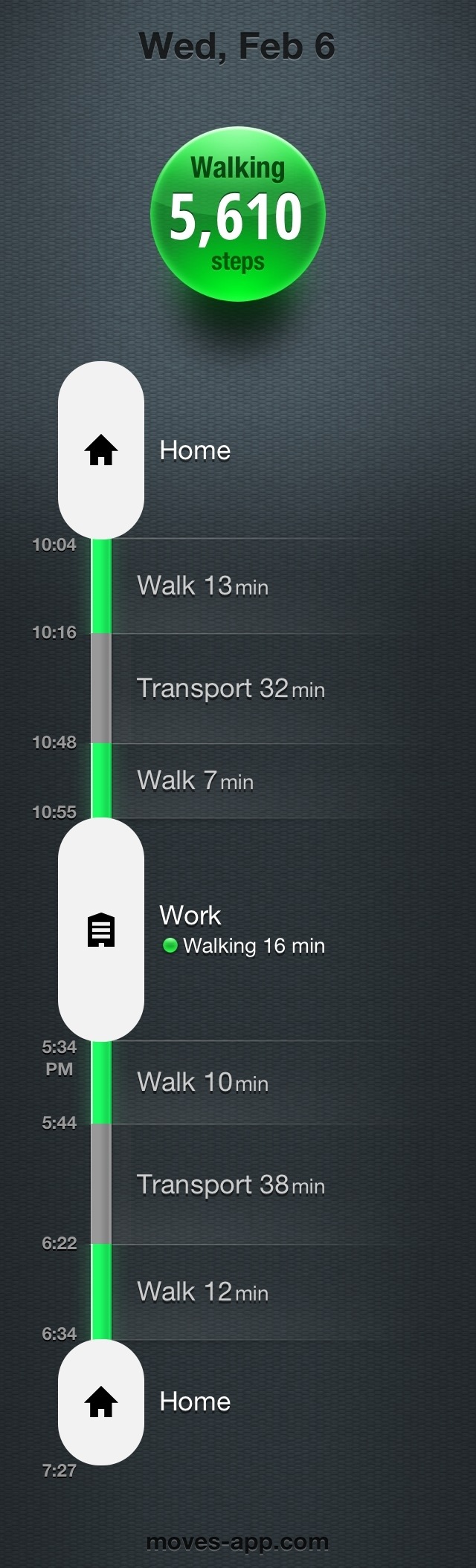
However, we already carry a device with all the gyroscopes, accelerometers, GPS receivers and other sensors needed to track our every movement: our smartphone. [2]Moves is a free app for the iPhone that promises to tell you exactly how much moving you’ve done each day. It’s capable of tracking how much you walk, run, and bike, as well as knowing when you’re traveling by car or train. It knows where you stop off, how long you’re there, and how much you’ve moved around while there. And it shows it all in a nice, attractive “Storyline†interface. [You can see mine here.](http://www.flickr.com/photos/sanspoint/8451508673/)
Moves is not the first application I’ve used to track my movements. For a while, I used MotionX Sleep, which also, yes, tracks your sleep. I ditched MotionX’s app because it crammed way too many features into an app. Navigating it was an absolute pain, and its sleep tracking paled in comparison to Sleep Cycle. Moves is a much simpler application, and therefore much easier to use. (Also, it’s icon is a lot nicer.)
It’s absolutely dead simple to use. Install the app, launch it, and go about your day. It runs in the background through some magical API that I presume to be undocumented, and uses the iPhone’s array of sensors to determine, roughly, where you are, how fast you’re traveling, and when you stop. If you’re anal about this sort of thing, and I am, you can even identify the places you’ve stopped off at. It comes with “Home,†“Work,†and “School†as basic, pre-populated options, and can pull a list of nearby places from Foursquare as well. You can view where you were during the day on a map, with green lines for walking, purple lines for running, blue for biking, gray for transit, and little bubbles for your various stops along the way.
Naturally, all this tracking means that your iPhone will be using sensors typically left off, and that means it’ll be using more battery. Moves promises that you’ll be able to get a whole day’s use out of your phone if you charge it fully at night. This seems to hold out, though the battery on my 4S dropped precipitously on a recent bus ride down to Philadelphia—so much so, that I turned the tracking off. However, I typically keep my phone plugged in at my desk, so I don’t have to worry about battery drainage anyway.
Moves does exactly what it advertises,[3] and it does so at a price point that makes no sense to me whatsoever. It’s not perfect. When it loses the GPS signal as I go into the subway each morning, it suddenly tracks me a good mile and a half northeast of my subway station before realizing I’m on the train. You can attempt to reclassify the paths on the map, but do so at your own peril. Trying it with my walk to the station today ended up with Moves thinking I either walked the whole subway trip, or rode the subway from my building door straight to the office door and now I can’t change it back.
Still, for the price, especially compared to a Fitbit or a Jawbone Up, Nike FuelBand, or all the other tracking gizmos out on the market, Moves is a perfectly valid alternative and an absolute steal. It could be even better if they added a little alert to say “Hey, you’ve been sitting at your desk for an hour. Go take a walk,†which is a feature I miss from MotionX Sleep. Integration with RunKeeper, Fitocracy, MyFitnessPal, or any of the other iPhone fitness tracking apps would be a nice bonus, too, but that’s not so much gilding the lily as it is dipping the lily in solid gold, and covering it with diamonds. If you want or need a way to track your own movements, own an iPhone, and don’t feel like buying another piece of hardware, Moves is exactly what you should get.
Fitbit sells a cheaper model for $60, but that one’s basically a glorified pedometer. ↩
If you think I was referring to the tracking device planted under your skin by the NSA, please remain where you are so that we can wipe your memory. Thank you. ↩
I didn’t test how well it identifies cycling, but that’s because I lack a bicycle. Someone stole mine. ↩